
| 일 | 월 | 화 | 수 | 목 | 금 | 토 |
|---|---|---|---|---|---|---|
| 1 | 2 | 3 | 4 | 5 | 6 | |
| 7 | 8 | 9 | 10 | 11 | 12 | 13 |
| 14 | 15 | 16 | 17 | 18 | 19 | 20 |
| 21 | 22 | 23 | 24 | 25 | 26 | 27 |
| 28 | 29 | 30 | 31 |
- PLG
- EC2
- nginx
- Spring Config Bus
- argocd
- cloud controller manager
- ssafy #싸피 #ssafy 12기 #싸피 12기 #ssafy 합격 #싸피 합격 #합격 후기
- Helm Chart
- sshtunneling
- k8s
- kaniko
- promtail
- elasticahe
- RDS
- port forawrding
- helm
- ssh
- model context protocol
- Docker
- Tunneling
- 생성형AI
- helm-chart
- spring
- Kubernetes
- ChatGPT
- spring cloud config
- 인프런강의
- springboot
- AWS
- redis oss
- Today
- Total
처누
[Spring] Spring Cloud Config(1) (Feat. Actuator API) 본문
이전의 프로젝트들에서 환경변수 값과 설정을 관리하기 쉽도록 Config Server를 따로 띄운 후 관리했다. 별도의 서버에서 Docker로 띄운 후 Config repo에서 해당 서버 ip, rabbitmq 및 다양한 설정들을 구현했던걸로 기억한다. 하나의 git repo에서 관리하다보니 굉장히 편리하다고 느꼈고, 앞으로 진행할 프로젝트에서도 이를 활용한다면 개발 진행에 있어서 굉장한 편리함을 얻을 수 있지 않을까 하는 생각이 들었다. 어떻게 동작하고 설정하는지 익혀보려고 한다
0. 들어가기 전
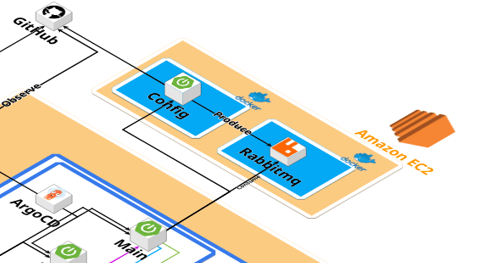
전에 진행했던 프로젝트 아키텍처를 보면 config server를 별도의 EC2서버에 띄워놓은 후 관리했다. 덕분에 아주 편하게 프로젝트를 진행했었는데 어떻게 동작하고 구현하는지 파헤쳐보자!

1. ❔Spring Cloud Config
Spring Cloud Config docs에는 다음과 같이 명시되어있다.
Spring Cloud Config provides server-side and client-side support for externalized configuration in a distributed system. With the Config Server, you have a central place to manage external properties for applications across all environments. The concepts on both client and server map identically to the Spring Environment and PropertySource abstractions, so they fit very well with Spring applications but can be used with any application running in any language. As an application moves through the deployment pipeline from dev to test and into production, you can manage the configuration between those environments and be certain that applications have everything they need to run when they migrate. The default implementation of the server storage backend uses git, so it easily supports labelled versions of configuration environments as well as being accessible to a wide range of tooling for managing the content. It is easy to add alternative implementations and plug them in with Spring configuration.
요약하자면 Spring Cloud Config는 분산 환경에서 애플리케이션 설정을 중앙에서 관리할 수 있는 솔루션이고, 서버(Config Server)와 클라이언트(Spring Boot 앱 등) 양쪽에서 지원하며, 기본적으로 Git을 백엔드로 사용한다. 이를 통해 환경(dev, test, prod 등)별 설정을 일관되게 관리할 수 있고, Spring의 Environment/PropertySource 개념과 자연스럽게 매핑된다고 적혀있다.
여기서 분산 시스템에서 외부 설정을 지원하기 위해 동작한다고 나와있는데 단일 모듈이거나 소규모의 프로젝트에서는 오히려 자원 낭비일까?라는 의문이 들었다. Config Server를 사용했던 프로젝트들은 멀티 모듈 혹은 MSA환경이었기 때문에 불필요하다고 생각하지 않았다. 하지만 단일 모듈의 프로젝트에서는 너무 투머치 같기도 한데.... 다음과 같이 고려하여 Spring Cloud Config를 사용할지 결정해도 좋을 것 같다.
- ⭕쓰는 게 합리적인 경우
- 여러 환경 간 설정 차이가 많아 관리가 어려울 때
- Config 파일을 GitOps(코드로 관리) 문화에 맞게 통합하고 싶을 때
- 장기적으로 서비스가 확장될 예정일 때
- ❌굳이 안 써도 되는 경우
- 서비스가 계속 소규모로 유지될 예정
- 환경별 차이가 적고 application-{profile}.yml로 충분히 커버 가능한 경우
Spring Cloud Config의 장단점
장점
- 중앙집중 & 버저닝 : Git, 파일시스템, native, consul, vault 등 백엔드에서 설정을 관리하고 버전 이력으로 롤백/감사를 보장한다.
- 프로파일/라벨 : 다양한 EndPoint 조합으로 환경별/릴리스별 구성을 고정 가능. Spring Cloud Config 공식 문서에서는 아래와 같은 요청 Endpoint 지원한다고 나와있다.
/{application}/{profile}[/{label}]
/{application}-{profile}.yml
/{label}/{application}-{profile}.yml
/{application}-{profile}.properties
/{label}/{application}-{profile}.properties
Spring Cloud Config
Spring Cloud Config provides server-side and client-side support for externalized configuration in a distributed system. With the Config Server, you have a central place to manage external properties for applications across all environments. The concepts o
docs.spring.io
- 런타임 갱신 : 클라이언트에서 actuator API 또는 Spring Cloud Bus, Watcher 등의 방법을 통해 변경을 반영한다.
- 푸시 갱신 : config server에 sping-cloud-config-monitor를 추가하고 Git Webhook을 /monitor로 연결하면 커밋 시 자동으로 Bus 이벤트를 전파하여 자동 갱신한다.
- 보안 연계 : 민감한 정보는 Vault 백엔드로 관리하거나 필요시 서버/클라이언트에서 {cipher}값을 대칭/비대칭 키로 복호화 지원한다.
단점
- SPOF/지연 의존성 : Config Server가 느리거나 불가용이면 클라이언트 부팅이 지연/실패할 수 있다. optional:configserver:로 완화 가능.
- @RefreshScope 한계와 비용 : 모든 빈이 자동으로 갱신되는 게 아니라 재생성/주입 비용이 발생한다. 케이스에 따라 의외의 동작이 생길 수 있다.
- 우선순위 복잡성 : 원격 소스가 기본적으로 높은 우선순위여서 로컬 값이 덮어써지지 않는다.
‼️Spring Cloud Config 설정 파일 우선 순위
설정 파일은 크게 다음의 위치에 존재할 수 있고, 다음의 순서대로 읽어진다. 나중에 읽어지는 것이 우선순위가 높다.
- 프로젝트의 application.yaml
- 설정 저장소의 application.yaml
- 프로젝트의 application-{profile}.yaml
- 설정 저장소의 {application name}/{application name}-{profile}.yaml
2. Spring Cloud Config 설정 파일 저장소 구축
테스트 용으로 아래와 같이 Git Repository에 디렉토리를 구성했다.

test-dev.yml, test-local.yml 파일 설정
//test-dev.yml
cheonwooo:
  profile: dev
  content: spring-cloud-config

//test-local.yml
cheonwooo:
  profile: local
  content: spring-cloud-config
3. Spring Cloud Confing Server 구축
Spring Cloud
Spring Cloud provides tools for developers to quickly build some of the common patterns in distributed systems (e.g. configuration management, service discovery, circuit breakers, intelligent routing, micro-proxy, control bus, short lived microservices and
spring.io
들어가보면 SpringBoot 버전 별 springCloudVersion이 명시되어있다. 프로젝트 생성을 3.5.4버전으로 했기 때문에 2025.0.0으로 설정함.
의존성 추가
//build.gradle
ext {
	set('springCloudVersion', "2025.0.0")
}

dependencies {
	implementation 'org.springframework.boot:spring-boot-starter'
	implementation 'org.springframework.cloud:spring-cloud-config-server'
}

dependencyManagement {
	imports {
		mavenBom "org.springframework.cloud:spring-cloud-dependencies:${springCloudVersion}"
	}
}
application.yml 설정
server:
  port: 8888
spring:
  application:
    name: config
  cloud:
    config:
      server:
        git:
          uri: https://github.com/Cheonwooo/Spring-Cloud-Cofing-test
          search-paths: config-file/**
          default-label: main
메인 클래스에 @EnableConfigServer 추가
@SpringBootApplication
@EnableConfigServer
public class TestApplication {

	public static void main(String[] args) {
		SpringApplication.run(TestApplication.class, args);
	}

}
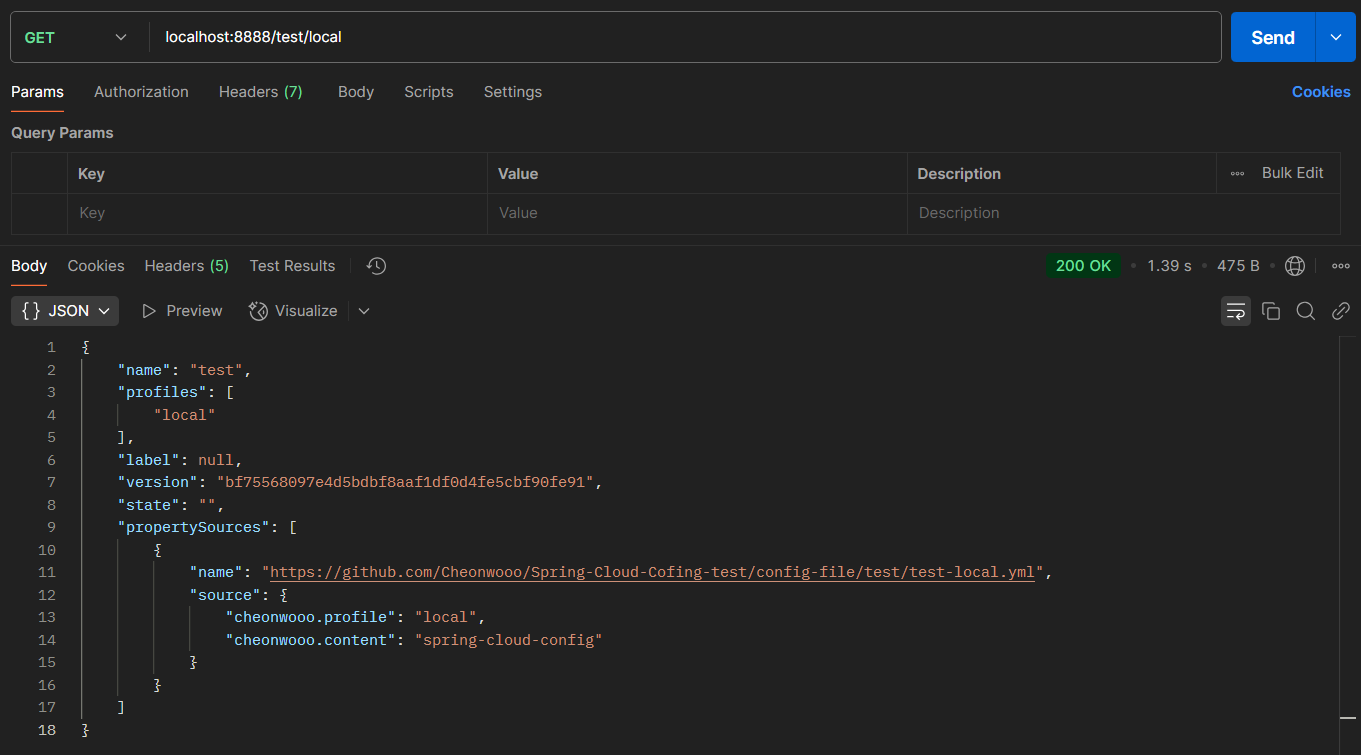
요청 테스트 시 설정한 값 그대로 요청을 받아오는 것을 볼 수 있다.
4. Spring Cloud Confing Client 설정
의존성 추가
ext {
	set('springCloudVersion', "2025.0.0")
}

dependencies {
	implementation("org.springframework.cloud:spring-cloud-starter-config")
	implementation("org.springframework.boot:spring-boot-starter-web")
	compileOnly("org.projectlombok:lombok")
	annotationProcessor("org.projectlombok:lombok")
	testImplementation("org.springframework.boot:spring-boot-starter-test")
}

dependencyManagement {
	imports {
		mavenBom "org.springframework.cloud:spring-cloud-dependencies:${springCloudVersion}"
	}
}
application.yml 설정
config server와 통신에 실패했을 때 에러를 던지고, 서버 실행을 멈추고 싶다면 "optional:" 부분을 제거해주면 된다
spring:
  application:
    name: test
  profiles:
    active: dev
  config:
    import: optional:configserver:http://localhost:8888
MyConfig.class 설정
@ConfigurationProperties 인자값은 spring cloud config server의 application.yml에서 설정한 경로를 입력해주면된다.
@Getter
@Setter
@ConfigurationProperties("cheonwooo")
@RefreshScope
@ToString
public class MyConfig {

    private String profile;
    private String content;
}
ConfigController.class
@RestController
@RequiredArgsConstructor
@Slf4j
public class ConfigController {

    private final MyConfig myConfig;

    @GetMapping("/config")
    public ResponseEntity<String> config() {
        log.info("{}", myConfig);
        return ResponseEntity.ok(myConfig.toString());
    }
}
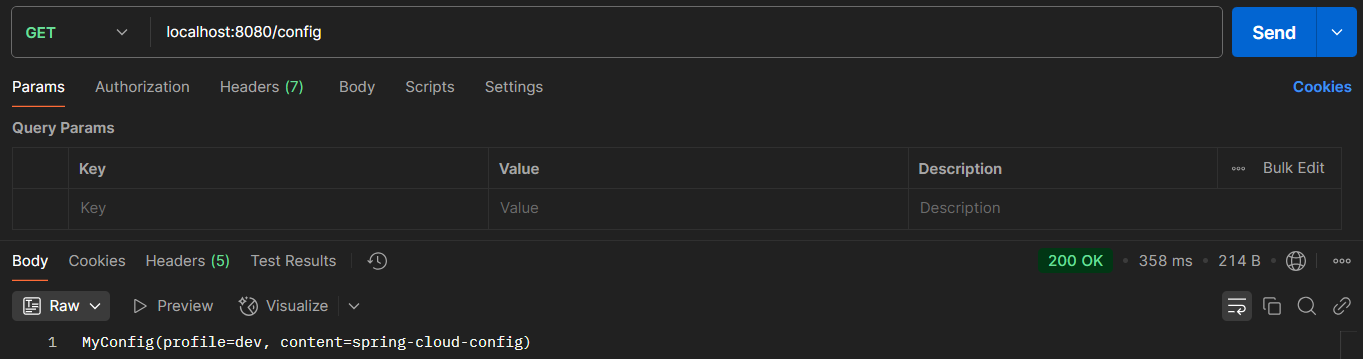
http://localhost:8080/config 호출하면 아래와 같이 정상적으로 요청을 받아오는 것을 볼 수 있다.
개발을 진행하면서 환경변수 값을 수정해야하는 상황이 반드시 생긴다. Spring Cloud Config는 이러한 상황을 다음과 같은 3가지 구현을 통해 해결할 수 있다.
- 변경한 설정을 갱신할 Spring Cloud Config Client의 actuator API 호출하기
- spring-clout-bus를 통해 변경을 감지하여 갱신 이벤트 전파하기
- Watcher를 통해 지속적으로 변경 여부를 질의하여 갱신하기
이 포스트에서는 1번 방법만 소개하고 2번, 3번은 추후에 작성해서 포스팅하도록 하겠습니다.
변경한 설정을 갱신할 Spring Cloud Config Client의 actuator API 호출하기
앞서 Spring Cloud config client의 apllication.yml 파일에서 아래와 같이 설정해놨다.
management:
  endpoints:
    web:
      exposure:
        include: "refresh"
Git Repository의 config-file에서 test-dev.yml을 아래와 같이 변경했다.
cheonwooo:
  profile: dev
  content: spring-cloud-config-change-test
설정 정보 재로딩을 위해 actuator/refresh를 호출하면 아래와 같이 성공

이제 다시 /config를 호출해보면 cheonwooo.content 부분이 변경된 것을 볼 수 있다.

사실 생각보다 복잡하거나 어려운 설정은 없다. Config Cloud Bus나 Wathcer 같은 방법과 암호화를 진행하지 않았는데 한스텝씩 밟으면서 올라가보려한다. 다음 포스팅엔 실제 EC2 서버에 config server를 띄워 값을 받아오는 것을 직접 구현해보려고 한다.
'Spring' 카테고리의 다른 글
| [Spring] Spring Cloud Config(2) (Feat. RabbitMQ, Watcher) (3) | 2025.08.24 |
|---|
